Try now Demo en
  • en
  • fr
  • de
  • Solutions
    • Use cases
      • Modern IntranetBuild strong internal culture & sense of belonging
      • Collaboration PlatformEfficient teamwork and project collaboration
      • Social NetworkEngage users & recognize contributions
      • Knowledge hubCentralize, organize and share company knowledge
      • Application PortalUnified access to business applications and information
    • Switch to eXo
      • Microsoft 365 AlternativeAn open-source digital workplace alternative to M365
      • Migrate to eXo PlatformA guided, secure migration path from your existing tools to eXo
  • Product
    • Overview
      • Platform overviewExplore core capabilities
      • Why eXoKey differentiators
      • InternationalisationMultilingual environments
      • MobileBranded mobile applications
    • Platform
      • No CodeTailor to your needs without code
      • IntegrationsConnectors & extension capabilities
      • Controlled AIGoverned, extensible AI
    • Technology
      • ArchitectureArchitecture & technology
      • SecuritySecurity measures
      • Open sourceComponents & licensing
  • Offers
    • EnterprisePrivate cloud or on-premise deployments
    • eXo HubsReady-to-use SaaS edition for teams
    • Compare EditionsCompare editions and choose the right fit
    • OEM EditionFor software vendors & service providers
    • ServicesDiscover eXo professional services
  • Resources
    • Resource center
      • Case studies
      • White Papers
      • Datasheets
      • Videos
    • FAQsAbout the software, the community and our offers
      • Platform & Use Cases
      • AI & Responsible AI
      • Deployment, Security & Compliance
      • Open-source, Pricing & Services
    • From The Blog
      • eXo Platform 7.1 is released
      • Digital sovereignty: when public organizations move from words to action
      • Cloud Vs On-premise Digital Workplace: Which one is right for your business?
  • Community
    • CommunityJoin our online community platform
    • DownloadLaunch eXo platform in your infrastructure
    • Source codeSource code on github
    • REST APIs & DocumentationAll REST APIs available in eXo Platform
  • Company
    • About us
    • Customers
    • Partners
    • Contact us
    • Newsroom
  • Menu mobile
    • Enterprise Offers
    • Blog
    • About us
    • Resource center
    • Careers
    • Contact us
    • Try eXo
Use cases
  • Modern Intranet Build strong internal culture & sense of belonging
  • Collaboration Platform Efficient teamwork and project collaboration
  • Social Network Engage users & recognize contributions
  • Knowledge hub Centralize, organize and share company knowledge
  • Application Portal Unified access to business applications and information
Switch to eXo
  • Microsoft 365 Alternative An open-source digital workplace alternative to M365
  • Migrate to eXo Platform A guided, secure migration path from your existing tools to eXo
Overview
  • Platform overview Explore core capabilities
  • Why eXo Key differentiators
  • Internationalisation Multilingual environments
  • Mobile Branded mobile applications
Platform
  • No Code Tailor to your needs without code
  • Integrations Connectors & extension capabilities
  • Controlled AI Governed, extensible AI
Technology
  • Architecture Architecture & technology
  • Security Security measures
  • Open source Components & licensing
Enterprise Private cloud or on-premise deployments
eXo Hubs Ready-to-use SaaS edition for teams
Compare Editions Compare editions and choose the right fit
OEM Edition For software vendors & service providers
Services Discover eXo professional services
Resource center
  • Case studies
  • White Papers
  • Datasheets
  • Videos
FAQs About the software, the community and our offers
  • Platform & Use Cases
  • AI & Responsible AI
  • Deployment, Security & Compliance
  • Open-source, Pricing & Services
From The Blog
  • eXo Platform 7.1 is released
  • Digital sovereignty: when public organizations move from words to action
  • Cloud Vs On-premise Digital Workplace: Which one is right for your business?
Community Join our online community platform
Download Launch eXo platform in your infrastructure
Source code Source code on github
REST APIs & Documentation All REST APIs available in eXo Platform
About us
Customers
Partners
Contact us
Newsroom
Enterprise Offers
Blog
About us
Resource center
Careers
Contact us
Try eXo
  1. Accueil
  2. Tutorial
  3. Connect Dropbox to your documents in eXo

Connect Dropbox to your documents in eXo

00-dropbox-connect-with-eXo

We’re pleased to announce that we’ve extended eXo Platform’s connectivity capabilities by adding Dropbox support to the Cloud Drive add-on. Dropbox is a veteran in cloud file storage, and many of us keep files there. Now, you can connect your Dropbox as a folder in your eXo Platform Personal Documents!
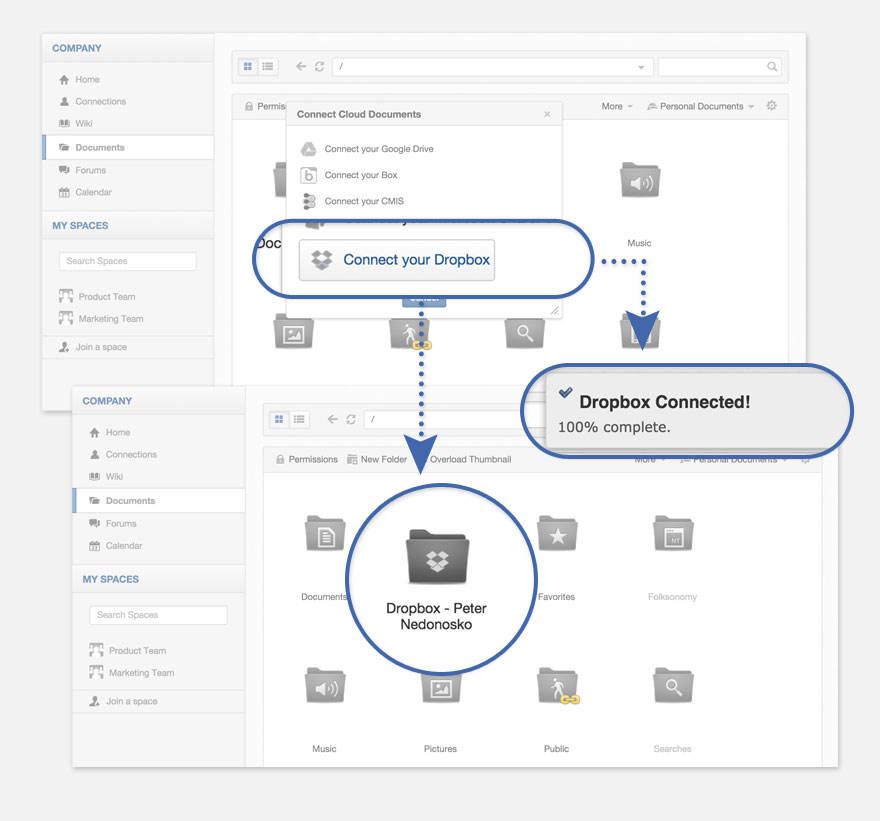
01-dropbox-exo-connect

All files stay in the cloud on the Dropbox servers—in eXo, you’ll get shortcuts to them in the same folder structure as in your Dropbox. Files can be opened to preview in eXo Documents. All Office formats will be converted to a viewable form on the fly, and you’ll see them just like any other local eXo files. The files also can be downloaded as PDFs. And there’s always a button that lets you open your files remotely on the Dropbox site!
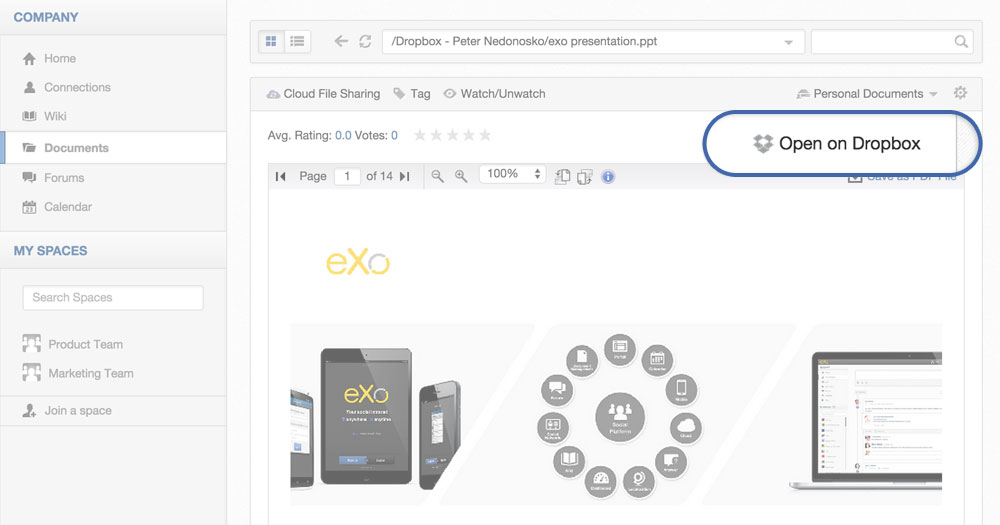
02-open-on-dropbox

eXo Platform also gives you an easy way to access files inside an intranet. It lets you share and collaborate with your documents in Spaces, groups, and personal drives. Just like before, you can copy-paste from your Cloud Drive folder to regular folders, and a link will be created inside eXo. But with this new version of Cloud Drive, we’ve improved this feature: you can now copy-paste to Spaces and group drives too. It’s a quick and easy way to share files with other users.
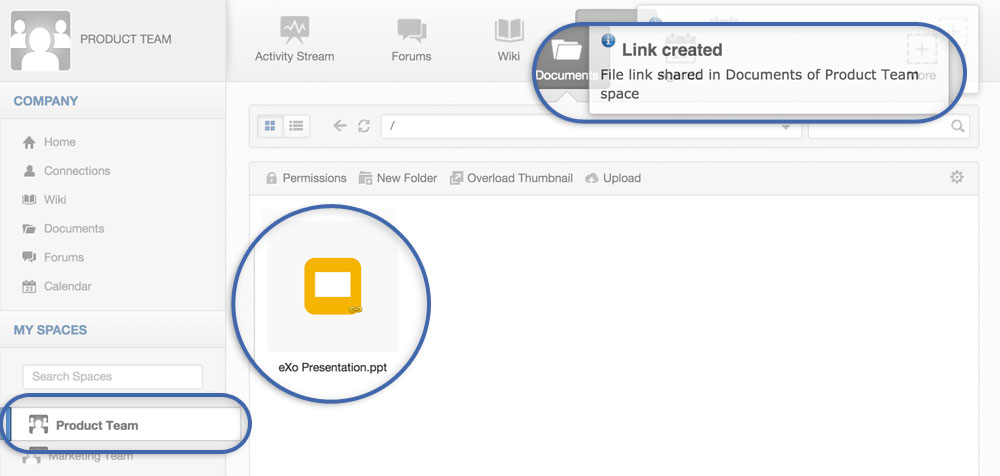
03-link-created

We also added a Cloud File Sharing menu, so you can control file sharing by adding new users and groups, or removing them.
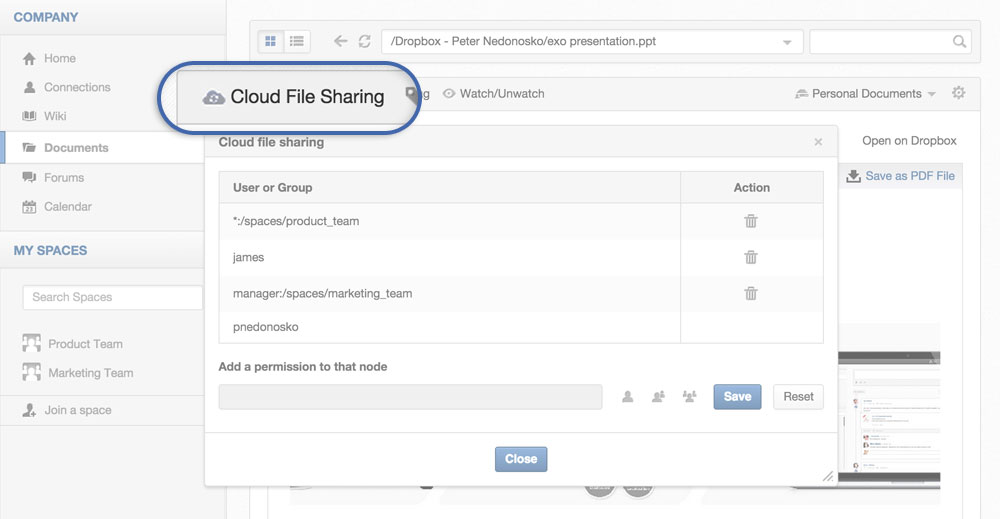
04-cloud-file-sharing

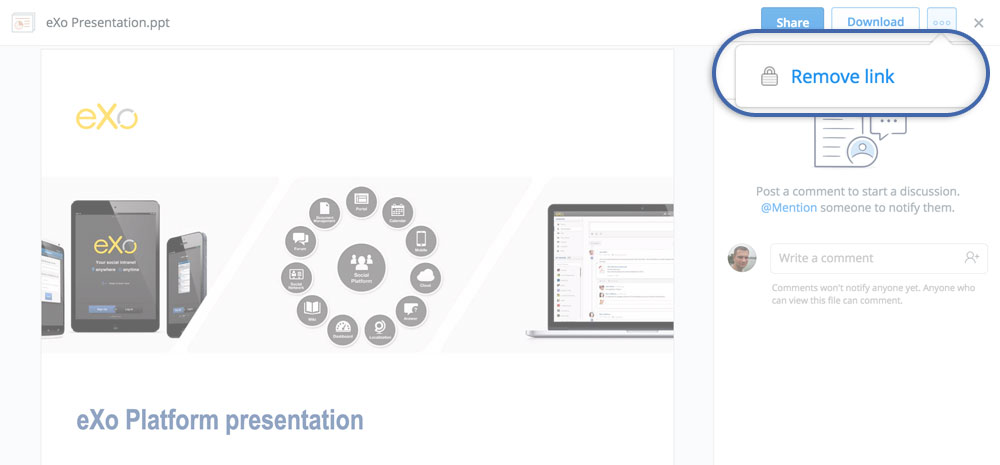
When pasting your Dropbox file to outside of your Personal Documents, eXo will create a link and share the file just as you would do in Dropbox. Sharing in Dropbox happens automatically when you share the file in eXo Platform. You can delete the file link later if you want to, or remove a shared group or user with the File Sharing settings. To remove the Dropbox shared link, you just go to your Dropbox home page (or use your mobile app) and remove the link there.
05-remove-link

That’s it for now!

Questions or suggestions? Let us know in the tribe.

To install Cloud Drive in your eXo Platform, use the following Add-ons Manager command:

$ ./addon install exo-cloud-drive

Add-on source code at Github:

https://github.com/exo-addons/cloud-drive-extension

Stay tuned for more 🙂

Join the eXo tribe by registering for the community and get updates, tutorials, support, and access to the Platform and add-on downloads!


make-the-most-out-of-eXo-platform4

Make the most out of eXo Platform 4

Register to the next weekly live demo session and get a complete overview of what you can do with eXo Platform 4. Reserve your seat now!

Brahim Jaouane

I am a Digital Marketing specialist specialized in SEO at eXo Platform. Passionate about new technologies and Digital Marketing. With 10 years' experience, I support companies in their digital communication strategies and implement the tools necessary for their success. My approach combines the use of different traffic acquisition levers and an optimization of the user experience to convert visitors into customers. After various digital experiences in communication agencies as well as in B2B company, I have a wide range of skills and I am able to manage the digital marketing strategy of small and medium-sized companies.

Full-featured digital workplace with everything your employees need to work efficiently, smartly integrated for a compelling employee experience

  • Product
    • Software tour
    • Internationalisation
    • Mobile
    • No Code
    • Architecture
    • Integrations
    • Security
    • Open Source
  • Uses cases
    • Employee Portal
    • Knowledge management
    • Entreprise Social Network
    • Employee Engagement
    • Community Management
    • Extranet
  • Guides
    • What is a digital workplace?
    • Intranet guide
    • What is an extranet?
    • Employee engagement
    • Collaboration guide
    • Teamwork guide
    • Internal Communication guide
  • Enterprise
    • Product offer
    • Services Offer
    • Customers
    • About us
  • Resources
    • FAQs
    • Resource Center
    • Intranet Portal
    • What Is a Collaboration Software?
    • Talent Management
    • Employee Connection
    • Employee Intranet
    • Improve internal communication
    • eXo Tribe
  • Terms and Conditions
  • Legal
  • Privacy Policy
  • Accessibility
  • Contact us
  • Sitemap
  • Facebook
  • Twitter
  • LinkedIn
wpDiscuz